
Taskflow
Taskflow is designed to facilitate the creation and management of single studies with varied configurations. By utilizing Taskflow, you can seamlessly implement A/B testing with different external URLs and distribution strategies, ensuring comprehensive data collection and analysis from your participants.
- Key Features:
- Flexible Study Creation: Easily set up studies with multiple variations in external URLs, enabling targeted testing and comparison.
- A/B Testing: Conduct robust A/B testing to evaluate different versions of your study, allowing for precise measurement of participant responses and behaviors.
- Granular Distribution: Fine grained control over the distribution of your URLs to a subsection of participants.
- Task Assignment Efficiency: Ideal for scenarios where you need to assign small numbers of participants to specific unique tasks. This streamlines the management process by handling a single study rather than managing multiple small studies.
Below is an example of how Taskflow reduces the study management complexity:
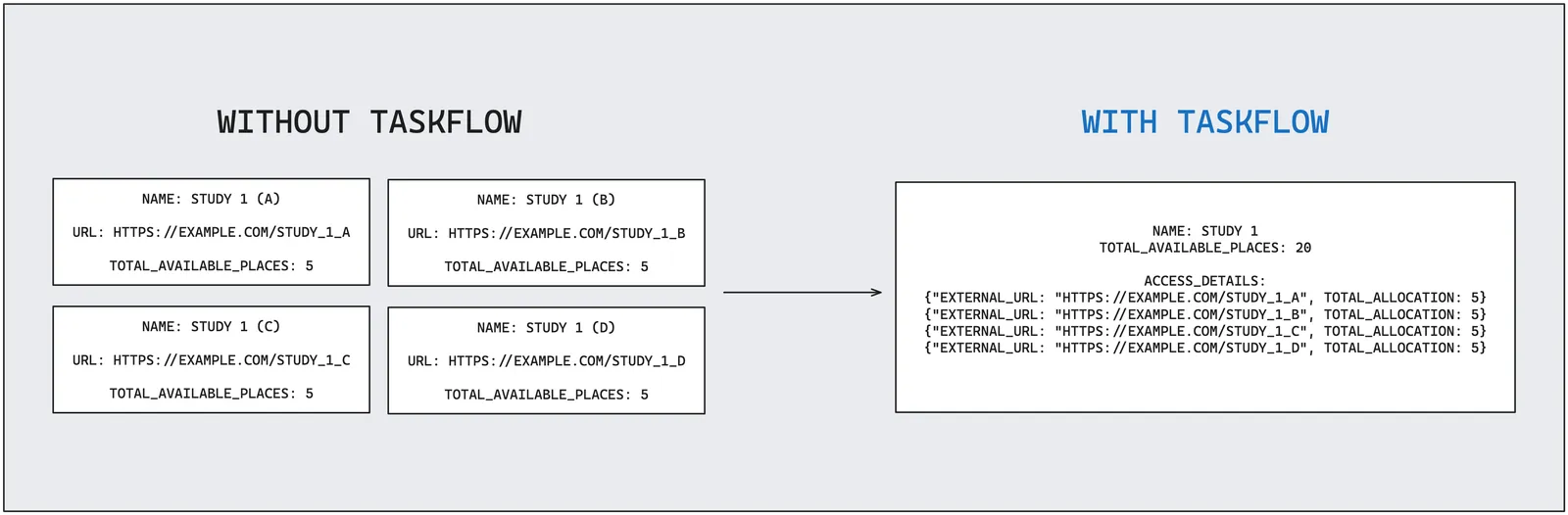
To get started with Taskflow, see the Create Study Documentation
Screenouts, Force-Completions, and Allocation Capacity
If your Taskflow study uses custom screening with a fixed screen-out reward, or has submissions that are force-completed, participants affected by these events change the allocation counts on your URLs. Understanding how this works helps you interpret the progress data and avoid unexpected capacity shortfalls.
How screenouts and force-completions interact with URL capacity
When you create a Taskflow study you set a total_allocation for each URL — this is the base number of participants you want allocated to that URL, and it determines the study’s total_available_places.
When a participant is screened out, they have consumed a screening interaction but have not completed the study. Taskflow automatically restores one available slot for that URL so that a replacement participant can be allocated in their place. It does this by tracking the cumulative number of screenouts separately in a slot_increments field, rather than modifying your total_allocation base value. Similarly, when a participant’s submission is force-completed, Taskflow tracks the cumulative number of force-completions separately in a place_increments field.
This means:
total_allocationalways reflects the base value you set — it is the figure used to determine the study’s total available places.slot_incrementsrecords how many extra slots have been added by screenouts.place_incrementsrecords how many extra slots have been added by force-completions.allocatedtracks the total number of participants currently assigned to the URL. For studies with screenouts or force-completions this can legitimately exceedtotal_allocation. The relationship is always:allocated ≤ total_allocation + slot_increments + place_increments.
capacity_increments is deprecated and being replaced by the separate slot_increments and place_increments fields. It will continue to be returned with the same combined value (slot_increments + place_increments) that it always represented, but please migrate to slot_increments and place_increments.
Reading the progress endpoint
The GET /api/v1/studies/{id}/access-details-progress/ endpoint returns a JSON object with the access-details collection id and a progress array — one object per configured external_url.
Each element of progress includes:
Example response (two URLs; second has no screenout- or force-completion-driven increments):
For the first URL above: total_allocation is 10 and there have been 3 screenouts (slot_increments: 3), so 11 participants have been allocated (replacements for screened-out participants). The effective ceiling is 13 (10 + 3 + 0), so 2 slots remain.
Increasing capacity after screenouts or force-completions
If your study is running low on available slots due to screenouts or force-completions, you can increase capacity by updating your study’s access_details via PATCH /api/v1/studies/{id}/. The total_allocation value you submit becomes the new base — your accumulated slot_increments and place_increments are preserved automatically on top of it.
For example, if your current state is total_allocation: 10, slot_increments: 3, place_increments: 0 and you submit a PATCH with total_allocation: 20, the effective ceiling becomes 23 (20 + 3 + 0).