
Introduction
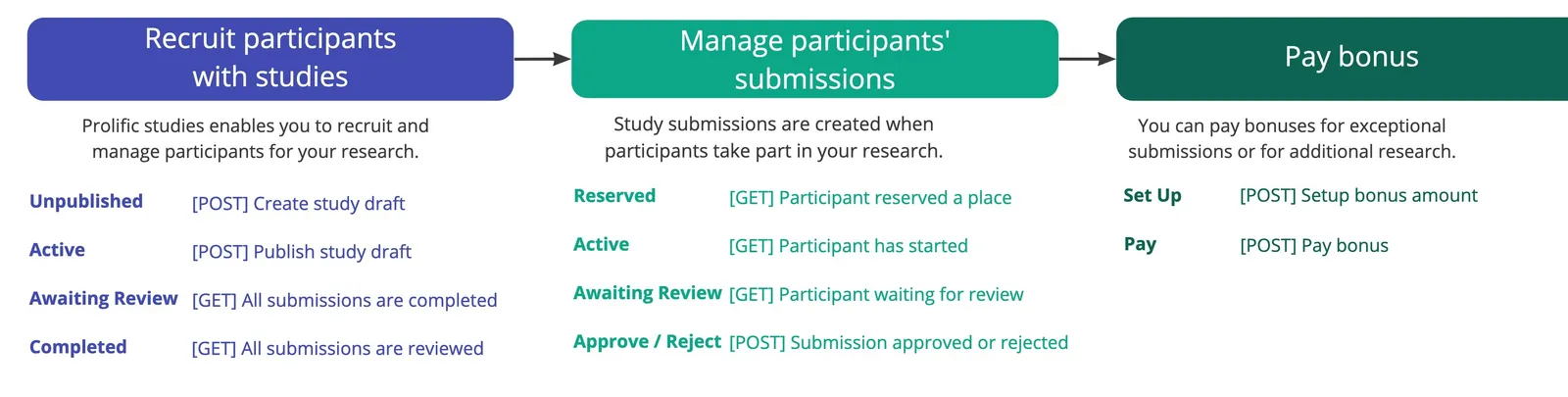
With Prolific’s API, you can recruit high-quality participants and manage your research workflows programmatically through your own app.
- Study - Create, update, and publish your Prolific studies
- Submissions - Approve and reject submissions programmatically
- Bonus - Pay a bonus to high-performing submissions
- Messages - Send and receive participant messages
- Workspaces - Collaborate with your teammates and organise research
- Survey - Create quick prescreening studies
- Participant groups - Manage lists of participants that you can use to launch studies
- Hooks - Be notified of certain events happening on your studies
Tip
If you are not ready for an API integration you can simply use our Web application to create studies to recruit participants and redirect them to your platform by providing a Study URL.
Not supported: The Prolific API does not support account management such as topping up your account or user management. Such features are only available in our web application. New or advanced features available in the web application may also not be available. If there are any capabilities you need that are not documented, please contact our support team.